Database workbench
Run SQL, inspect structure and data, export CSV and preview changes in local databases, relational databases and relational databases. Browse collections and query documents in document databases.
Terminal, files, databases and developer tools.
Your everyday server work, in one Mac app.
macOS 14+ · SSH / SFTP · 3 hosts free
iOS, Android, Windows, and Linux are in development
Less repeated setup. Less switching apps. Explore the real interface and see how your everyday workflow fits together.
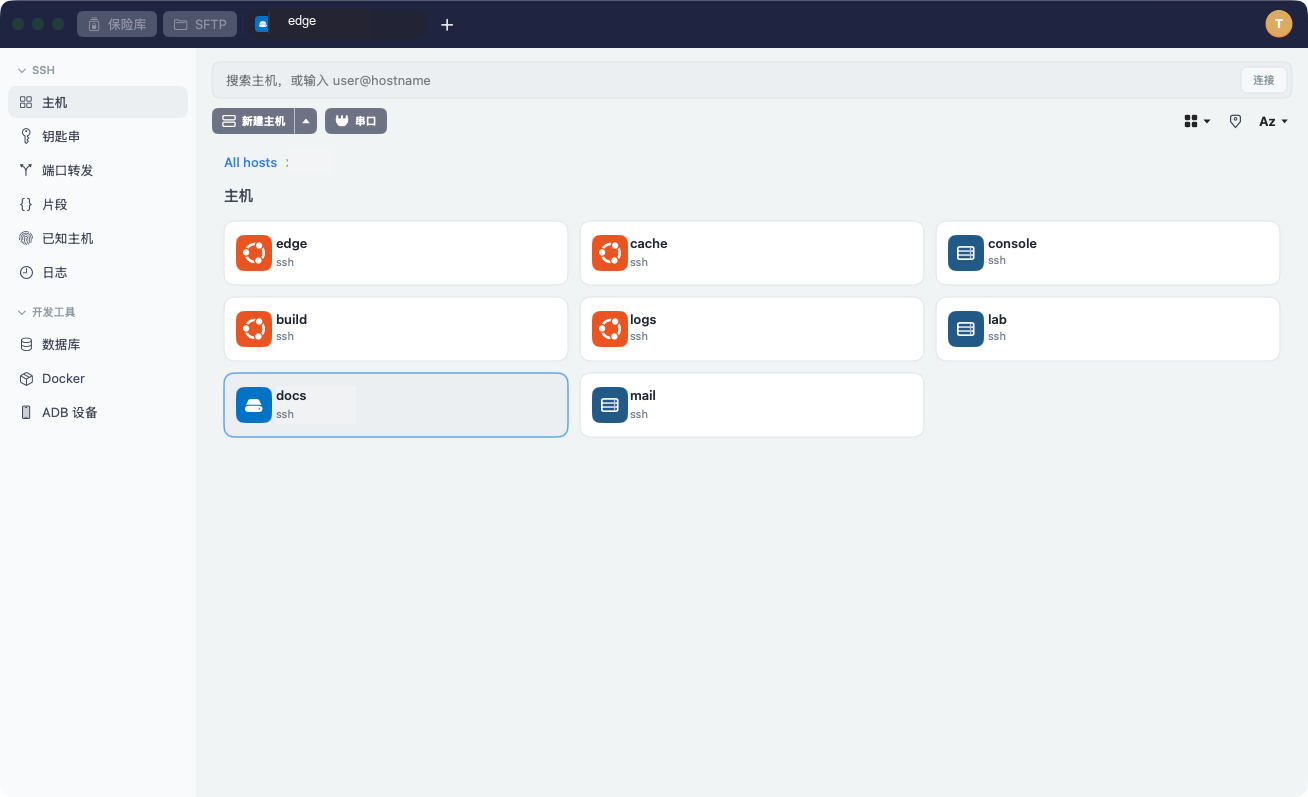
Save hosts as cards, organize groups and search by name or address. Import existing connection settings and reuse identities instead of entering the same login details again.
User guideOpen a two-pane file browser beside your SSH session. Drag files, transfer folders, download and rename without opening another app. SFTP is included in Free.
User guideEdit remote text with syntax highlighting, line numbers and go-to-line, or use your preferred external editor. Write-back pauses when a remote change is detected so you can resolve the conflict.
User guideSwitch tabs, drag to split and focus a pane. Save a set of hosts to reconnect later. Enable simultaneous input when needed, and reuse snippets or suggestions from your command history.
User guideSwitch tabs, drag to split and focus a pane. Save a set of hosts to reconnect later. Enable simultaneous input when needed, and reuse snippets or suggestions from your command history.
ubuntu@production:22SSHSave a connection → Work with files → Keep working
Inspect data, manage containers and work with devices. A natural continuation of your server workflow.
Version note: databases, Containers and ADB are features of the standalone build. Their entries are hidden in the current App Store build.
Containers needs an available Containers environment; Android tools need adb and an authorized device; serial needs a compatible device. local databases needs a local database file; other databases need a reachable service and appropriate credentials.
Passwords and private keys are encrypted locally. Basic connections need no cloud account. Set up or unlock your local vault on first use.
Opt in to sync hosts, groups, snippets and known hosts. Passwords and private keys stay out of sync; configure them again on another Mac.
The Mac app is available now. The same software is in development for iOS, Android, Windows, and Linux, so hosts, groups, snippets, and known hosts can continue on the device you are using. Passwords and private keys stay out of sync.
Keep using SSH and SFTP with up to three saved hosts. Choose Pro for more hosts, port forwarding and jump hosts.
¥0
3 hosts · SSH and SFTP
Password / key authentication · Basic import
¥1,980
Unlimited hosts
Port forwarding · Jump hosts
¥5,980
One purchase for the current personal Pro edition
No automatic renewal
The three prices above are for macOS. Each platform is listed below. The price shown in each store takes precedence.
Each platform is purchased separately. Buying on one device does not turn another device into Pro. Amounts are the prices shown for Japan. Other countries follow each store's price tier.
This version does not include port forwarding, jump hosts, snippets, or cloud sync. It is a separate purchase from the Mac app. The price shown in the App Store applies after release.
Not for sale yet. The store price at release takes precedence. A purchase on another platform does not unlock this one.
Not for sale yet. The store price at release takes precedence. A purchase on another platform does not unlock this one.
Not for sale yet. The store price at release takes precedence. A purchase on another platform does not unlock this one.
Basic SSH needs no cloud account. Set up the local vault on first use, then unlock it to work. Cloud registration and sync are separate, optional steps.
Containers needs an available Containers environment; Android tools need adb and an authorized device; serial needs a compatible device. local databases needs a local database file; other databases need a reachable service and appropriate credentials.
It saves the set of hosts and reconnects them when opened. Terminal content and the original split proportions are not restored.
macOS 14+ · SSH / SFTP · 3 hosts free
The store link is being prepared. Contact us for release information or explore the user guide.